Free shopping cart software for online order forms
Add products to a customizable form, let customers choose quantities and options, and connect checkout to the information and follow-up your business needs.

What is shopping cart software?
Shopping cart software gives buyers a way to select products or services, change quantities, review their choices and continue to checkout. In a conventional online store, the cart sits between a product catalog and payment. In an order-form workflow, the cart can also appear alongside customer questions, delivery details, uploads, signatures, appointment choices or approval information.
That difference matters. A compact order-form cart can be a strong fit for businesses that sell a focused range of products, configurable services, event packages, food orders, wholesale items or custom work. It keeps the purchase and the operational details in one structured submission.
Product selection
Present relevant products or services and collect quantities, variants and add-ons.
Custom checkout questions
Gather delivery, attendee, project or personalization details in the same flow.
Post-order automation
Send confirmations, alert staff, route exceptions and connect eligible integrations.
Who benefits from an online form with a shopping cart?
Small product catalogs
Sell a focused set of physical goods without constructing a large retail storefront.
Restaurants and caterers
Collect menu selections, quantities, pickup or delivery details and dietary notes.
Wholesale suppliers
Capture bulk orders, account identifiers, purchase-order references and requested dates.
Service businesses
Offer packages, optional extras, project questions, appointment requests or deposits.
Events and education
Combine registrations, tickets, attendee information, merchandise and fees.
Custom makers
Collect specifications, dimensions, files and customer approval details with the order.
Shopping Cart, Product and Payment Processor fields
AbcSubmit’s current feature matrix lists Shopping Cart, Product and Payment Processor fields. Together, these components can create an order experience that is more structured than a simple payment button.
- Use Product fields when the customer needs to choose an item or service
- Use a Shopping Cart when buyers should review multiple selections and quantities
- Use a Payment Processor field when payment is part of the form flow
- Add Name, Address, Email and Phone fields for fulfilment and communication
- Use conditional rules to reveal relevant options and questions
- Add Terms of Service or Signature fields when acknowledgement is required
Features and limits differ by plan. Review AbcSubmit plans and pricing before designing the final checkout.
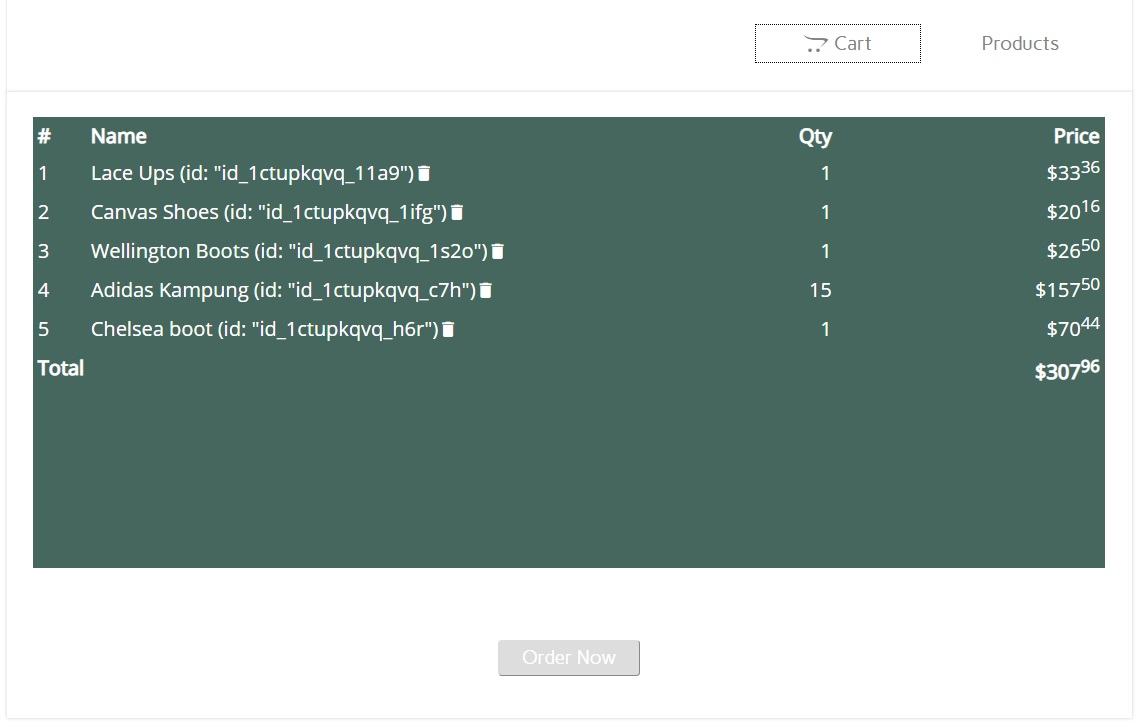
How to create an online shopping cart form
Plan the purchase
List products, prices, variants, fulfilment details and the questions required for a complete order.
Build the form
Add the shopping cart or product fields, customer information, options and conditional logic.
Configure checkout
Connect an available payment method and define calculations, confirmation text and required policies.
Test and publish
Run realistic orders on desktop and mobile, then share the form or embed it on your website.
Start from an appropriate template when possible, then remove fields that do not support the purchase. A shorter form is not automatically better: the goal is to collect everything required to fulfil the order without asking irrelevant questions.
Compare free shopping cart options by business need
| Requirement | What to evaluate | Why it matters |
|---|---|---|
| Products and quantities | Variants, add-ons, minimum quantities and cart review | Prevents ambiguous or incomplete orders |
| Calculations | Prices, discounts, fees, taxes and shipping rules | Customers should understand the amount before payment |
| Payment methods | Provider, currency, regional availability and account requirements | The cart must work with the way you can legally accept payment |
| Custom fields | Address, files, signatures, scheduling and conditional questions | The checkout must capture fulfilment details |
| Publishing | Hosted link, website embed and mobile behavior | Customers need a reliable way to access and complete the cart |
| Automation | Confirmations, staff notifications, approvals and integrations | The order needs to reach the next operational step |
| Plan limits | Forms, submissions, fields, storage and users | A free plan must still support realistic demand |
| Data controls | Access, retention, exports and account security | Order information may contain personal or commercially sensitive data |
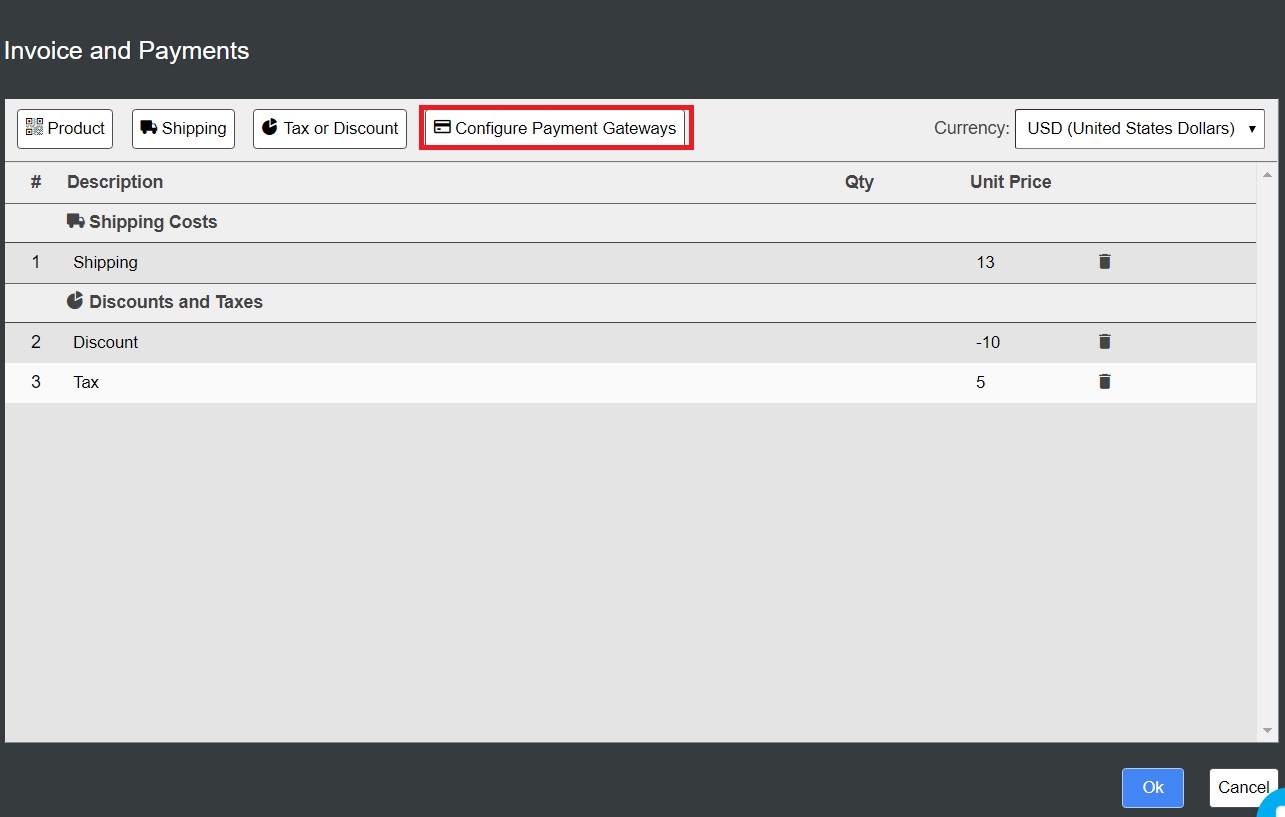
Connect the cart to an appropriate payment method
AbcSubmit’s pricing matrix currently lists PayPal, Stripe Checkout, Square, Braintree, PayPal Checkout, Cash on Delivery, EuPlatesc and BitPay among its payment options. Exact availability depends on the selected plan and configuration.
The payment provider—not merely the form—determines important parts of the transaction, including account approval, supported countries and currencies, payout timing, disputes and processing fees. Confirm those details directly with the provider.
- Display currency and totals clearly
- Explain taxes, shipping charges and additional fees
- Test successful, declined and cancelled payments
- Avoid collecting raw card information in ordinary text fields
- Give customers a usable confirmation and support path
Improve shopping cart conversion without sacrificing clarity
A checkout should reduce uncertainty. Customers need to understand what they are buying, what it costs, when it will arrive or begin, and what happens after they submit.
Use specific product names
Distinguish variants and bundles clearly instead of relying on internal product codes.
Show the total early
Make quantities, discounts, delivery charges and fees understandable before payment.
Remove avoidable fields
Do not collect information that is unrelated to payment, fulfilment, service or compliance.
Design for phones
Use readable labels, touch-friendly controls and a logical single-column progression where useful.
Explain the next step
Tell buyers whether they will receive a receipt, approval, delivery update or personal response.
Build trust with precision
Publish accurate contact, cancellation, refund, delivery and privacy information.
Automate order processing after checkout
A completed cart is the start of fulfilment. AbcSubmit workflows can use notifications, conditional branches, approvals, edit requests and integration actions, depending on the plan. This can reduce manual forwarding while giving teams a clearer record of what happened.
- Send the buyer a confirmation with relevant order details
- Notify the correct location, department or fulfilment team
- Route unusually large, wholesale or custom orders for review
- Request missing information without restarting the complete order
- Connect supported integrations for downstream work
- Track the submission and decisions through a repeatable process
Explore form automation software, multi-step approval workflows and workflow templates. If you need broader guidance about order forms, read how to sell products online with forms and payments.
Free shopping cart launch checklist
- Confirm the plan supports the fields, submissions and storage you expect
- Add clear product names, descriptions, prices, quantities and options
- Test all conditional rules and calculations with realistic combinations
- Verify taxes, shipping, discounts and one-time fees where configured
- Check the payment provider’s currency, country and account requirements
- Publish cancellation, return, fulfilment and privacy information
- Test confirmation messages and internal notifications
- Complete purchases on common mobile and desktop screen sizes
- Test keyboard navigation, field labels and error messages
- Verify failed, abandoned, repeated and high-value order scenarios
- Define who monitors new orders and how quickly they respond
- Review the setup again whenever products, prices or policies change
Free shopping cart software FAQs
Does AbcSubmit offer free shopping cart software?
AbcSubmit currently lists a Free plan and includes Shopping Cart and Product fields in its feature matrix. The free plan has limits, so compare current features and capacity before using it for a live business.
Can I add a shopping cart to an existing website?
You can publish an AbcSubmit form and embed it on an existing website. Test the embedded cart on the site, theme, browser and mobile devices your customers use.
Can I accept credit card payments through the cart?
AbcSubmit lists several payment processor options. The actual transaction is handled through the configured provider, subject to its account, country, currency and fee requirements.
Can a cart calculate taxes, discounts or shipping?
AbcSubmit supports form calculations and ecommerce-oriented fields, but your exact rules must be configured and tested. Tax and shipping obligations vary by business and location, so obtain appropriate professional guidance where necessary.
Is a form-based cart suitable for a large online store?
It is best suited to focused catalogs and purchases that need custom questions or workflows. A dedicated ecommerce platform may be more appropriate for large inventory, advanced merchandising and complex fulfilment.
Can I sell services instead of physical products?
Yes. A cart or product field can be combined with project questions, booking information, files, signatures or payment, depending on your service process and selected plan.
What costs should I check besides the software plan?
Consider payment-processing fees, domain or website costs, integrations, storage, staff time, taxes, refunds and fulfilment. Compare total operating cost rather than the subscription price alone.
Build a cart around the way you sell
Create a focused order experience, test the complete payment and fulfilment journey, and expand only when your process requires it.